 planwithzen
Add monthly income
Enter the take-home pay and other income you expect for the month.
Organize income, bills, everyday spending, savings, and debt payoff in one clear plan. See what is available, decide where it should go, and adjust as real life changes.
Self-directed financial planning tools for educational purposes only. Not financial, investment, tax, or legal advice.
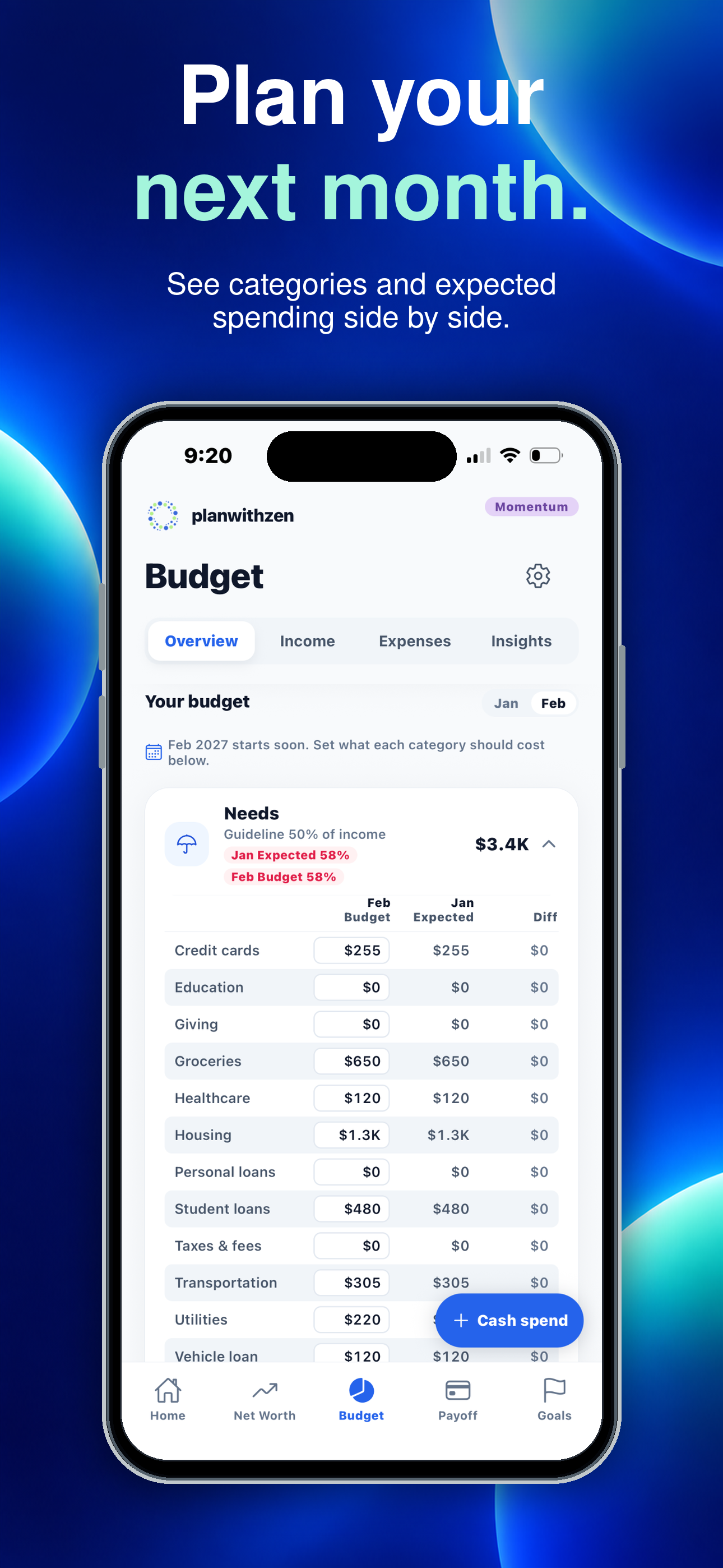
How budgeting works
planwithzen guides you through the information needed to create a budget and keeps the result connected to the rest of your financial picture.
Enter the take-home pay and other income you expect for the month.
Separate bills and spending into needs and wants categories.
Adjust category amounts until planned outflows fit the money available.
Keep the budget current manually or use optional connected accounts with Momentum.
Built around the 50/30/20 framework: planwithzen helps organize planned spending across needs, wants, and savings or debt payoff. You choose the categories and amounts; the framework is a planning guide, not a requirement.
Budgeting features
Simple pricing
Free gives you a complete financial picture and practical plans. Momentum helps you keep those plans current and see how they change over time.
Free
Understand where you stand and build your first plans.
No subscription or bank connection required.
Momentum
Work your plans month after month and watch your progress.
Renews monthly until canceled. Manage or cancel through Apple ID settings.
| Capability | Free | Momentum |
|---|---|---|
| Manual financial tracking | ✓ | ✓ |
| Plaid account connections | — | ✓ |
| Monthly budget | 2 months | 6 months |
| Actual-versus-budget comparison | — | ✓ |
| Consumer debt payoff approaches | Highest interest first | 3 approaches |
| Mortgage-payoff plan | — | ✓ |
| Active financial goals | 2 | 10 |
| Custom categories | 4 | 10 |
| Current net worth and health score | ✓ | ✓ |
| Financial history | — | 6 months |
Budgeting questions, clearly answered
A budgeting app helps you organize expected income and planned expenses so you can decide how your money should be used. planwithzen connects that monthly plan with debt payoff, financial goals, and net worth.
Yes. Free lets you enter your financial information, build a working monthly budget, create a consumer-debt payoff plan, manage two financial goals, and review your net worth and financial health.
Momentum adds connected accounts, longer-term budgeting, spending comparisons, additional payoff approaches, mortgage-payoff planning, more goals, and financial history for $9.99 per month.
No. You can build and maintain your budget entirely through manual entry. Connecting eligible accounts through Plaid is an optional Momentum feature that reduces manual balance and transaction updates.
A planwithzen budget begins with take-home pay and other expected income. You then plan amounts for needs, wants, savings, and debt payoff using standard or custom categories.
The Overview is the month as one view: money in, money out, and what is left over. A positive figure means more came in than went out; a negative one means spending exceeded income.
Expenses appear in the month they are actually due, so a quarterly bill lands where it is paid rather than spread across months it is not. There is more on monthly cash flow and how the two sides of the month fit together.
Recurring bills and everyday spending both, each in the month it is due — see tracking cash flow for how that affects what a heavy month looks like. Categories show where money went without changing the underlying record, so you can group things the way you think about them.
How consistent your income looks across the history available, alongside the rest of your cash flow. It is an educational view based on what has been recorded, not a prediction or guarantee of future income.
Review a manually maintained budget at least once a month and update it whenever income, bills, or priorities change. Regular updates make planned-versus-actual comparisons and the broader financial picture more useful.
Yes. planwithzen includes 22 built-in categories and lets you add your own. Free supports four custom categories, and Momentum supports ten.
You decide whether each category belongs under needs, wants, or savings and debt payoff.
You choose what you plan to pay each month. When one debt is paid off, its planned payment moves to the next debt based on your selected payoff approach.
Free includes the highest-interest-rate-first approach, which typically minimizes interest when payment amounts and other assumptions remain consistent. Momentum adds smallest-balance-first, largest-balance-first, and side-by-side comparisons.
The plan and the budget use the same figures. Each debt’s minimum payment appears in your budget under its own category, and whatever your plan adds above the minimum appears under Debt payoff, in savings and debt payoff. You enter each amount once.
Mortgage planning is included with Momentum. Enter your current balance, interest rate, principal-and-interest payment, and other requested loan details.
planwithzen estimates your payoff date, remaining interest, and how additional principal payments could affect both. It does not change your loan or make payments.
Your regular mortgage payment appears in your budget under Housing, in needs. Additional principal you test on the mortgage page stays there as an estimate and is not added to your budget.
Yes. Set a target amount, target date, and planned monthly contribution. Free supports two active goals. Momentum supports up to ten.
Each goal’s planned monthly contribution appears in your budget under Financial goals, in savings and debt payoff, so what you set aside sits in the same monthly plan as everything else. A goal you have finished no longer appears.
planwithzen uses safeguards designed to protect the financial information it handles, including encryption for stored information and encrypted transmission between the app and supporting services.
Plaid handles connections to eligible financial institutions. planwithzen does not receive or store the login credentials you use with those institutions.
Related planning tools
Coming to iPhone
Plan monthly spending, connect the budget to debt payoff and financial goals, and understand how today’s decisions affect your complete financial picture.